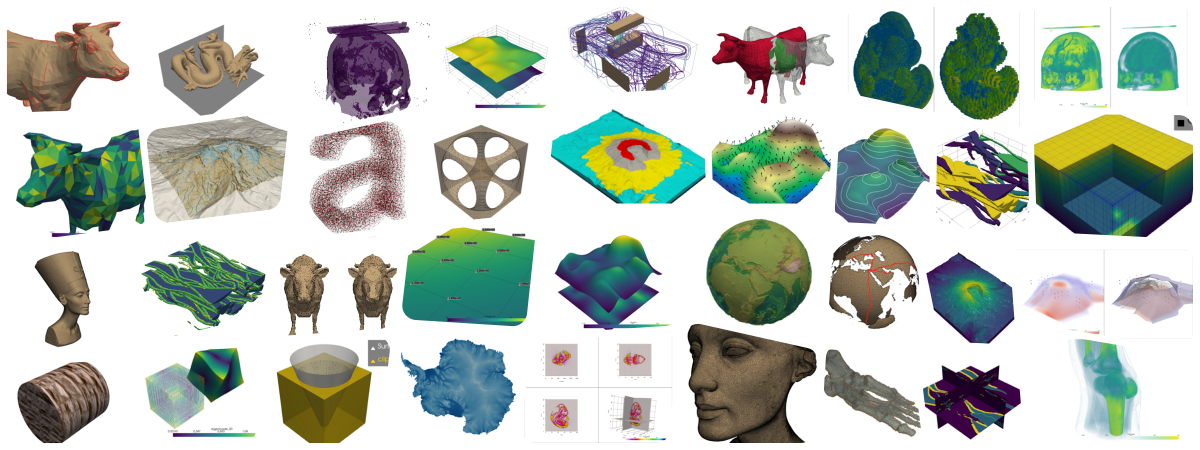
SENCE 2025 Examples
In [1]:
Copied!
import insel
insel.block('sum', 2, 3)
import insel
insel.block('sum', 2, 3)
Out[1]:
5.0
In [2]:
Copied!
insel.block('do', parameters=[1, 10, 1])
insel.block('do', parameters=[1, 10, 1])
Out[2]:
[1.0, 2.0, 3.0, 4.0, 5.0, 6.0, 7.0, 8.0, 9.0, 10.0]
In [3]:
Copied!
insel.block('gain', 2, 5, 7, parameters=[3], outputs=3)
insel.block('gain', 2, 5, 7, parameters=[3], outputs=3)
Out[3]:
[6.0, 15.0, 21.0]
In [4]:
Copied!
insel.template('x_times_y.vseit', x=2, y=4)
insel.template('x_times_y.vseit', x=2, y=4)
Out[4]:
8.0
streamlit
# save to web_app.py
# run with:
#   streamlit run my_web_app.py

import streamlit as st
import insel

st.title("INSEL online")
x = st.slider("X", 0, 100, 25)
y = st.slider("Y", 0, 100, 25)

result = insel.block('SUM', x, y)
st.write(f"{x} + {y} = {result}")
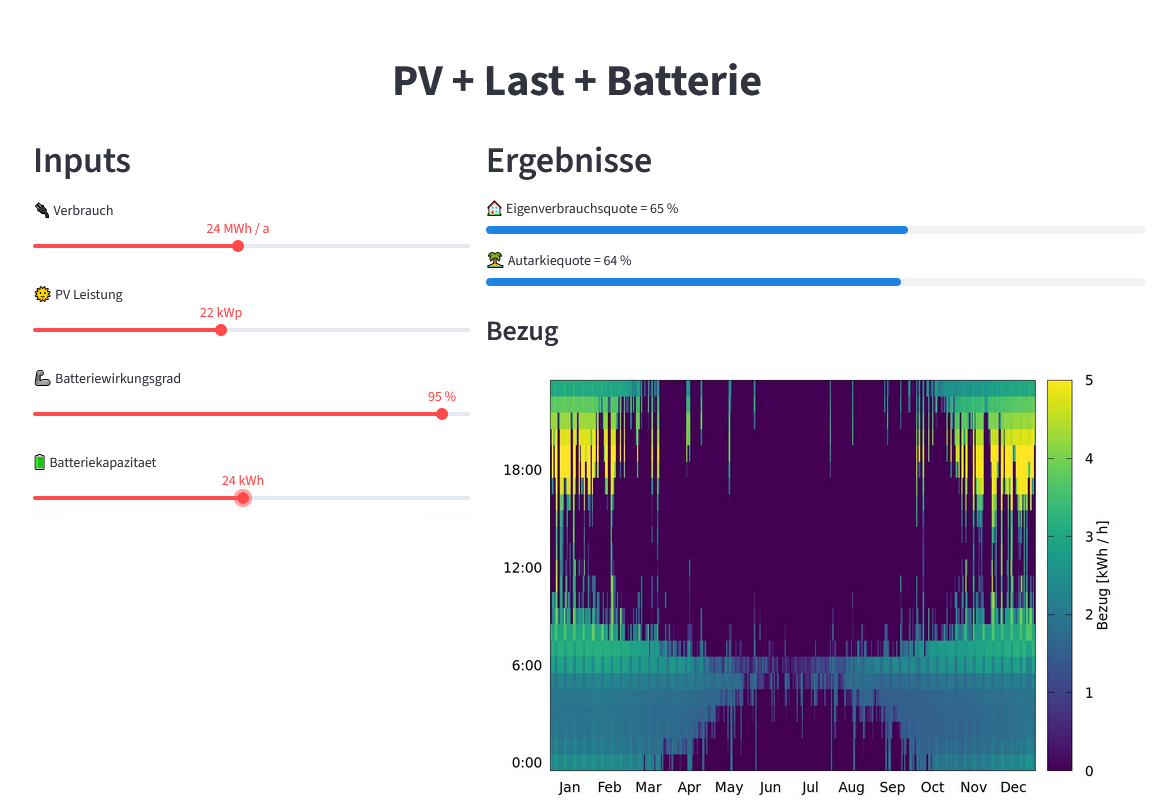
import insel
import streamlit as st

st.set_page_config(layout="wide", page_title="PV + Last + Batterie")
st.markdown(
    "<h1 style='text-align: center'>PV + Last + Batterie</h1>", unsafe_allow_html=True
)

left, right = st.columns([2, 3])

with left:
    st.header("Inputs")
    verbrauch = st.slider("🔌 Verbrauch", 1, 50, 10, format="%g MWh / a")
    pvleistung = st.slider("🌞 PV Leistung", 1, 50, 10, format="%g kWp")
    wirkungsgrad = st.slider("🦾 Batteriewirkungsgrad", 1, 100, 95, format="%g %%")
    kapazitaetbatterie = st.slider("🔋 Batteriekapazitaet", 0, 50, 5, format="%g kWh")

with right:
    st.header("Ergebnisse")
    eigenverbrauchsquote, autarkiequote, cycles = insel.template(
        "Last_PV_Batterie.vseit",
        MWh_Verbrauch=verbrauch,
        kWp_PV=pvleistung,
        Kapazitaet_Batterie=kapazitaetbatterie,
        Wirkungsgrad_Batterie=wirkungsgrad / 100,
    )

    st.progress(
        eigenverbrauchsquote,
        text=f"🏠 Eigenverbrauchsquote = {eigenverbrauchsquote*100:.0f} %",
    )

    st.progress(
        autarkiequote,
        text=f"🏝️ Autarkiequote = {autarkiequote*100:.0f} %",
    )

    st.badge(f"{cycles:.0f} Zyklen / a")
    st.subheader("Bezug")
    # NOTE: Could add a random id, for multi-users
    st.image("/tmp/Last_PV_Batterie.png")
random facts
In [5]:
Copied!
import requests

# Example: API for a random fact
url = "https://uselessfacts.jsph.pl/random.json?language=en"
response = requests.get(url)

if response.status_code == 200:
    data = response.json()
    print("💡 Did you know?")
    print(data['text'])
else:
    print("Could not fetch the fact.")
import requests
# Example: API for a random fact
url = "https://uselessfacts.jsph.pl/random.json?language=en"
response = requests.get(url)
if response.status_code == 200:
data = response.json()
print("💡 Did you know?")
print(data['text'])
else:
print("Could not fetch the fact.")
💡 Did you know?
Humans use a total of 72 different muscles in speech.
rich
In [6]:
Copied!
from rich.progress import track
import time

for i in track(range(20), description="Hacking NASA..."):
    time.sleep(0.1)  # Simulate work
from rich.progress import track
import time
for i in track(range(20), description="Hacking NASA..."):
time.sleep(0.1) # Simulate work
Output()
prettymapp
In [9]:
Copied!
from prettymapp.geo import get_aoi
from prettymapp.osm import get_osm_geometries
from prettymapp.plotting import Plot
from prettymapp.settings import STYLES

aoi = get_aoi(
    # Location can either be defined by coordinates:
    coordinates=(45.43900, 12.32625),
    # or an address:
    # address="Praça Ferreira do Amaral, Macau",
    radius=1500,
    rectangular=False,
)

df = get_osm_geometries(aoi=aoi)

fig = Plot(
    df=df,
    aoi_bounds=aoi.bounds,
    draw_settings=STYLES["Citrus"],
    credits=False,
).plot_all()

fig.set_dpi(120)

# If you want to save it to a PNG file, with 3600x3600px
# fig.savefig("images/venice.png", dpi=300)
from prettymapp.geo import get_aoi
from prettymapp.osm import get_osm_geometries
from prettymapp.plotting import Plot
from prettymapp.settings import STYLES
aoi = get_aoi(
# Location can either be defined by coordinates:
coordinates=(45.43900, 12.32625),
# or an address:
# address="Praça Ferreira do Amaral, Macau",
radius=1500,
rectangular=False,
)
df = get_osm_geometries(aoi=aoi)
fig = Plot(
df=df,
aoi_bounds=aoi.bounds,
draw_settings=STYLES["Citrus"],
credits=False,
).plot_all()
fig.set_dpi(120)
# If you want to save it to a PNG file, with 3600x3600px
# fig.savefig("images/venice.png", dpi=300)

Satellite images
In [10]:
Copied!
from IPython.display import Image
Image(filename='images/houat.png')
from IPython.display import Image
Image(filename='images/houat.png')
Out[10]:

pandas
In [7]:
Copied!
import pandas as pd

pd.read_csv('https://web.stanford.edu/class/archive/cs/cs109/cs109.1166/stuff/titanic.csv')
import pandas as pd
pd.read_csv('https://web.stanford.edu/class/archive/cs/cs109/cs109.1166/stuff/titanic.csv')
Out[7]:
| Survived | Pclass | Name | Sex | Age | Siblings/Spouses Aboard | Parents/Children Aboard | Fare | |
|---|---|---|---|---|---|---|---|---|
| 0 | 0 | 3 | Mr. Owen Harris Braund | male | 22.0 | 1 | 0 | 7.2500 |
| 1 | 1 | 1 | Mrs. John Bradley (Florence Briggs Thayer) Cum... | female | 38.0 | 1 | 0 | 71.2833 |
| 2 | 1 | 3 | Miss. Laina Heikkinen | female | 26.0 | 0 | 0 | 7.9250 |
| 3 | 1 | 1 | Mrs. Jacques Heath (Lily May Peel) Futrelle | female | 35.0 | 1 | 0 | 53.1000 |
| 4 | 0 | 3 | Mr. William Henry Allen | male | 35.0 | 0 | 0 | 8.0500 |
| ... | ... | ... | ... | ... | ... | ... | ... | ... |
| 882 | 0 | 2 | Rev. Juozas Montvila | male | 27.0 | 0 | 0 | 13.0000 |
| 883 | 1 | 1 | Miss. Margaret Edith Graham | female | 19.0 | 0 | 0 | 30.0000 |
| 884 | 0 | 3 | Miss. Catherine Helen Johnston | female | 7.0 | 1 | 2 | 23.4500 |
| 885 | 1 | 1 | Mr. Karl Howell Behr | male | 26.0 | 0 | 0 | 30.0000 |
| 886 | 0 | 3 | Mr. Patrick Dooley | male | 32.0 | 0 | 0 | 7.7500 |
887 rows × 8 columns
In [8]:
Copied!
pd.read_csv('http://ultra.ericduminil.com/data/all_ultras.csv', sep=';')
pd.read_csv('http://ultra.ericduminil.com/data/all_ultras.csv', sep=';')
Out[8]:
| id | name | miles | division | laps | discipline | country | age | elapsed_time | kilometers | venue | year | |
|---|---|---|---|---|---|---|---|---|---|---|---|---|
| 0 | miami_2025_151 | Joe Mazzone | 320.29200 | Open | 217 | Push | US | 30-39 | 23.92384 | 515.460 | Miami Ultra | 2025 |
| 1 | miami_2021_49 | Joe Mazzone | 313.90000 | Open | 215 | Push | US | 30-39 | 23.64750 | 505.173 | Miami Ultra | 2021 |
| 2 | dutch_2017_13 | Rick Pronk | 313.17108 | Open | 160 | Push | NL | 1-49 | 23.95963 | 504.000 | Dutch Ultra | 2017 |
| 3 | dutch_2018_18 | Rick Pronk | 311.21376 | Open | 159 | Push | NL | 1-49 | 23.91601 | 500.850 | Dutch Ultra | 2018 |
| 4 | miami_2016_201 | Andrew Andras | 309.52000 | Open | 212 | Push | US | 30-39 | 23.96444 | 498.124 | Miami Ultra | 2016 |
| ... | ... | ... | ... | ... | ... | ... | ... | ... | ... | ... | ... | ... |
| 1569 | miami_2015_256 | Jennifer Gonzalez | 7.30000 | Women | 5 | Push | US | 19-29 | 8.89917 | 11.748 | Miami Ultra | 2015 |
| 1570 | miami_2019_26 | Zack Knezevic | 7.30000 | Open | 5 | Push | US | 30-39 | 17.43500 | 11.748 | Miami Ultra | 2019 |
| 1571 | miami_2025_138 | Scott Ziegler | 5.90400 | Open | 4 | Push | US | 40-49 | 23.14916 | 9.502 | Miami Ultra | 2025 |
| 1572 | miami_2022_132 | Zack K | 2.92000 | Open | 2 | Push | World | 40-49 | 13.85972 | 4.699 | Miami Ultra | 2022 |
| 1573 | miami_2023_64 | Leonard L Leffler | 1.46000 | Open | 1 | Paddle | US | 50-59 | 23.00992 | 2.350 | Miami Ultra | 2023 |
1574 rows × 12 columns
In [11]:
Copied!
import xarray as xr

# from https://berkeleyearth.org/data/
ds = xr.open_dataset("~/Downloads/Land_and_Ocean_LatLong1.nc")
import xarray as xr
# from https://berkeleyearth.org/data/
ds = xr.open_dataset("~/Downloads/Land_and_Ocean_LatLong1.nc")
In [12]:
Copied!
ds
ds
Out[12]:
<xarray.Dataset>
Dimensions:      (longitude: 360, latitude: 180, time: 2100, month_number: 12)
Coordinates:
  * longitude    (longitude) float32 -179.5 -178.5 -177.5 ... 177.5 178.5 179.5
  * latitude     (latitude) float32 -89.5 -88.5 -87.5 -86.5 ... 87.5 88.5 89.5
  * time         (time) float64 1.85e+03 1.85e+03 ... 2.025e+03 2.025e+03
Dimensions without coordinates: month_number
Data variables:
    land_mask    (latitude, longitude) float64 ...
    temperature  (time, latitude, longitude) float32 ...
    climatology  (month_number, latitude, longitude) float32 ...
Attributes:
    Conventions:           Berkeley Earth Internal Convention (based on CF-1.5)
    title:                 Native Format Berkeley Earth Surface Temperature A...
    history:               09-Jan-2025 20:35:17
    institution:           Berkeley Earth Surface Temperature Project
    land_source_history:   04-Jan-2025 19:11:11
    ocean_source_history:  06-Jan-2025 11:47:59
comment: This file contains Berkeley Earth surface temperat...In [13]:
Copied!
ds.sel(longitude=9, latitude=48.7, method='nearest')['temperature'].plot();
ds.sel(longitude=9, latitude=48.7, method='nearest')['temperature'].plot();

In [14]:
Copied!
ds.sel(time=2003 + 7.5 / 12, method='nearest').sel(latitude=slice(35, 65), longitude=slice(-10,30))['temperature'].plot();
ds.sel(time=2003 + 7.5 / 12, method='nearest').sel(latitude=slice(35, 65), longitude=slice(-10,30))['temperature'].plot();

In [15]:
Copied!
ds.climatology.sel(month_number=0).plot();
ds.climatology.sel(month_number=0).plot();

In [16]:
Copied!
stuttgart = ds.sel(longitude=9, latitude=48.7, method='nearest')
stuttgart
stuttgart = ds.sel(longitude=9, latitude=48.7, method='nearest')
stuttgart
Out[16]:
<xarray.Dataset>
Dimensions:      (time: 2100, month_number: 12)
Coordinates:
    longitude    float32 9.5
    latitude     float32 48.5
  * time         (time) float64 1.85e+03 1.85e+03 ... 2.025e+03 2.025e+03
Dimensions without coordinates: month_number
Data variables:
    land_mask    float64 ...
    temperature  (time) float32 ...
    climatology  (month_number) float32 ...
Attributes:
    Conventions:           Berkeley Earth Internal Convention (based on CF-1.5)
    title:                 Native Format Berkeley Earth Surface Temperature A...
    history:               09-Jan-2025 20:35:17
    institution:           Berkeley Earth Surface Temperature Project
    land_source_history:   04-Jan-2025 19:11:11
    ocean_source_history:  06-Jan-2025 11:47:59
comment: This file contains Berkeley Earth surface temperat...In [17]:
Copied!
import numpy as np
import numpy as np
In [18]:
Copied!
months = (np.floor((stuttgart.time - np.floor(stuttgart.time))*12)).astype(int)
months = (np.floor((stuttgart.time - np.floor(stuttgart.time))*12)).astype(int)
In [19]:
Copied!
df = pd.DataFrame({
              'year': np.floor(stuttgart.time).astype(int),
              'month': months + 1,
              'temperature': stuttgart.climatology[months] + stuttgart.temperature,
             },
            )
df
df = pd.DataFrame({
'year': np.floor(stuttgart.time).astype(int),
'month': months + 1,
'temperature': stuttgart.climatology[months] + stuttgart.temperature,
},
)
df
Out[19]:
| year | month | temperature | |
|---|---|---|---|
| 0 | 1850 | 1 | -2.558053 |
| 1 | 1850 | 2 | 5.262820 |
| 2 | 1850 | 3 | 2.164932 |
| 3 | 1850 | 4 | 8.349158 |
| 4 | 1850 | 5 | 10.533581 |
| ... | ... | ... | ... |
| 2095 | 2024 | 8 | 20.524185 |
| 2096 | 2024 | 9 | 15.114173 |
| 2097 | 2024 | 10 | 12.679502 |
| 2098 | 2024 | 11 | 7.373162 |
| 2099 | 2024 | 12 | 4.583126 |
2100 rows × 3 columns
In [20]:
Copied!
df.to_csv('output/stuttgart_monthly_temperatures.csv', index=False, sep='\t')
df.to_csv('output/stuttgart_monthly_temperatures.csv', index=False, sep='\t')
Edward R. Tufte, The Visual Display of Quantitative Information
Book: https://www.edwardtufte.com/book/the-visual-display-of-quantitative-information/
In [21]:
Copied!
# From https://www.ajnisbet.com/blog/tufte-in-matplotlib

import matplotlib.pyplot as plt
import matplotlib.ticker as ticker

# Global options.
plt.rcParams['font.family'] = 'serif'

# Data from p74 of Visual Display of Quantitative Information.
x = list(range(1951, 1960))
y = [264, 231, 274, 241, 322, 286, 283, 247, 243]

# Plot line, line masks, then dots.
fig, ax = plt.subplots()
ax.plot(x, y, linestyle='-', color='black', linewidth=1, zorder=1)
ax.scatter(x, y, color='white', s=100, zorder=2)
ax.scatter(x, y, color='black', s=20, zorder=3)

# Remove axis lines.
ax.spines['top'].set_visible(False)
ax.spines['right'].set_visible(False)

# Set spine extent.
ax.spines['bottom'].set_bounds(min(x), max(x))
ax.spines['left'].set_bounds(225, 325)

# Reduce tick spacing.
x_ticks = list(range(min(x), max(x)+1, 2))
ax.xaxis.set_ticks(x_ticks)
ax.yaxis.set_major_locator(ticker.MultipleLocator(base=25))
ax.tick_params(direction='in')

# Adjust lower limits to let data breathe.
ax.set_xlim([1950, ax.get_xlim()[1]])
ax.set_ylim([210, ax.get_ylim()[1]])

# Axis labels as a title annotation.
ax.text(1958, 320, 'Connecticut Traffic Deaths,\n1951 - 1959')
plt.show();
# From https://www.ajnisbet.com/blog/tufte-in-matplotlib
import matplotlib.pyplot as plt
import matplotlib.ticker as ticker
# Global options.
plt.rcParams['font.family'] = 'serif'
# Data from p74 of Visual Display of Quantitative Information.
x = list(range(1951, 1960))
y = [264, 231, 274, 241, 322, 286, 283, 247, 243]
# Plot line, line masks, then dots.
fig, ax = plt.subplots()
ax.plot(x, y, linestyle='-', color='black', linewidth=1, zorder=1)
ax.scatter(x, y, color='white', s=100, zorder=2)
ax.scatter(x, y, color='black', s=20, zorder=3)
# Remove axis lines.
ax.spines['top'].set_visible(False)
ax.spines['right'].set_visible(False)
# Set spine extent.
ax.spines['bottom'].set_bounds(min(x), max(x))
ax.spines['left'].set_bounds(225, 325)
# Reduce tick spacing.
x_ticks = list(range(min(x), max(x)+1, 2))
ax.xaxis.set_ticks(x_ticks)
ax.yaxis.set_major_locator(ticker.MultipleLocator(base=25))
ax.tick_params(direction='in')
# Adjust lower limits to let data breathe.
ax.set_xlim([1950, ax.get_xlim()[1]])
ax.set_ylim([210, ax.get_ylim()[1]])
# Axis labels as a title annotation.
ax.text(1958, 320, 'Connecticut Traffic Deaths,\n1951 - 1959')
plt.show();